


Speedometer: GPS Speedometer
4.54.93K Reviews
App Specs
- Version
- 1.2.6
- Updated On
- License
- Free
- Downloads
- 10,000,000+
- Developer
- Simple Design Ltd.
- Categories
- Maps & Navigation
- Platform
- Android
Screenshots
 Analysis by AppCompare
I judge a GPS speedometer by a simple question: does it give me a useful sense of pace without turning a quick check into a project? Speedometer: GPS Speedometer is built around that straightforward job. It is a navigation app from Simple Design Ltd., and its focus is checking movement speed rather than replacing a full maps app. That distinction matters: I’d reach for it when I want speed and distance at a glance, not when I need turn-by-turn directions or a detailed route plan.
GPS-based readings are best treated as a practical estimate, not a substitute for a vehicle’s calibrated dashboard or a safety instrument. Signal conditions, the device’s position, and the kind of movement all affect how steady a reading feels. I find this app most useful as a second reference: it can help me notice whether I’m moving faster than expected, while the vehicle’s own instruments and posted limits remain the things to follow.
What to expect from a GPS speed reading
The appeal is that the phone can show movement speed without relying on a vehicle’s built-in display. That makes the app potentially handy in a car with an awkward-to-read dashboard, on a bicycle, or during a walk when curiosity gets the better of me. But GPS speed is not instantaneous in every situation. When I start moving, slow down sharply, or pass through a place where the signal is obstructed, a displayed value may take a moment to settle. I’d avoid reacting to a brief fluctuation as if it were a precise measurement.
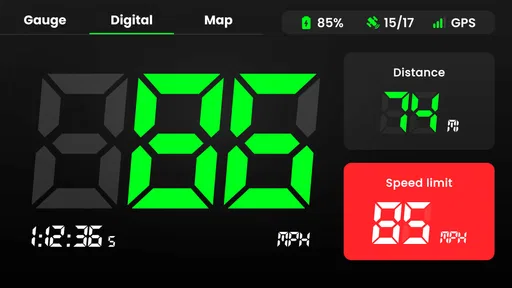
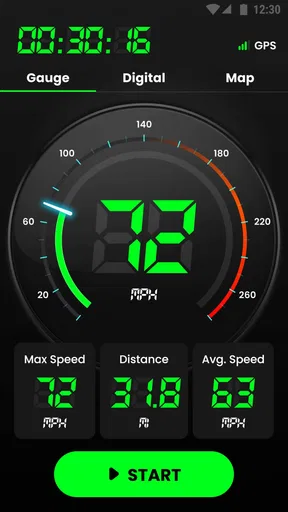
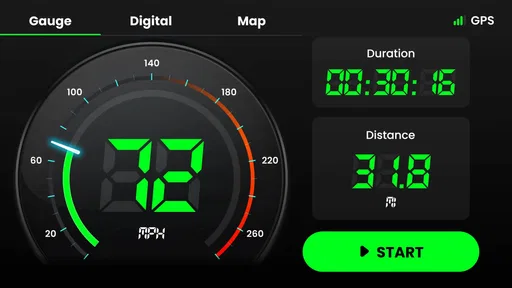
The store summary emphasizes speed, distance, speed limits, and time. Together, those are useful for a basic journey check: speed tells me how fast I’m moving, while distance and time give the trip some context. They don’t turn a phone into a professional measuring device, and I wouldn’t use a phone reading to challenge a ticket or assess a vehicle’s performance. For everyday awareness, though, the combination is more useful than a speed number in isolation.
Getting started and choosing the right moment
First things first, downloading Speedometer: GPS Speedometer from the app store is a breeze. It’s available for both Android and iOS, so no one is left out. Once installed, you’re greeted with a sleek interface that’s super easy to navigate. Whether you’re tech-savvy or not, you’ll find this app refreshingly straightforward.
As soon as you open the app, it connects to your GPS to get ready for action. You’ll want to ensure you have your location services turned on for the app to work its magic. It’s like having your personal co-pilot who’s always ready to roll!
For a more dependable check, I’d open it before setting off and give the phone a clear view of the sky while stationary. Starting in a basement garage, between tall buildings, or beneath a dense cover can make a GPS reading slower to establish or less steady. A useful habit is to compare the display only after you’re moving at a consistent pace, rather than judging it during the first moments of a journey.
Worth Reading Before You Choose

Flipboard Shows What News Apps Must Do Beyond the Feed

Switching to Android Auto Means Rethinking Your Driving Routine

Google Calendar Makes a Crowded Week Easier to Manage

Ludo King Makes the Most of the Minutes Between Plans

Baby Panda World Brings Quick Play to Modern Phones, but Its Game Library Feels Busy

ESPN’s Live Game View Makes Following Close Games Easier
How it fits alongside maps and dashboards
A regular maps app is usually the better choice when the main question is where to go. Maps can put your position in context, show a route, and guide a trip; a focused speedometer is more direct when all I want is a readable speed check. A car’s dashboard has the advantage of being designed for driving and is the more appropriate reference for operating the vehicle. This app makes sense as an extra tool, not as a replacement for either one.
That difference is especially clear on a familiar commute. If I already know the route but want to check how my pace changes between open roads and slower streets, a speed-focused display can answer that without making me follow a map. On a new route, I’d keep navigation on the device or system intended for it and avoid splitting attention between screens. For cycling, I’d set the phone securely before moving and glance only when it is safe; checking a display in traffic is never worth the distraction.
Getting Started
Speedometer apps are also a different proposition from dedicated bike computers or vehicle equipment. A phone offers convenience because it is already with me, but a purpose-built device may be easier to mount, easier to see in bright conditions, or better suited to long rides. If I ride regularly and need dependable ride analysis, I’d compare specialist cycling tools rather than assume a simple speed display covers that need. For occasional checks, using a phone can be a sensible, low-effort option.
The Features that Stand Out
What I love about this app is its simplicity paired with functionality. It doesn’t try to do too much, but what it does, it does really well. Here's what caught my attention:
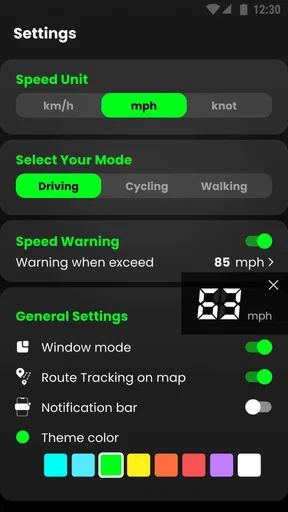
- Real-time Speed Tracking: Whether you’re in a car, on a bike, or even strolling, the app provides real-time speed updates. You can switch between miles per hour (mph), kilometers per hour (km/h), or even nautical miles if you’re feeling adventurous.
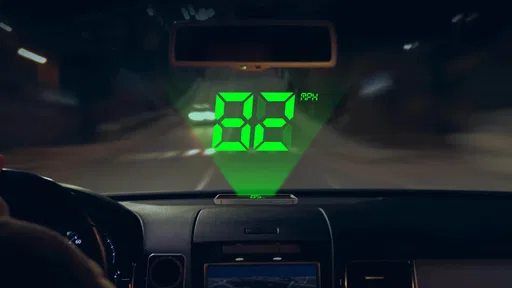
- HUD Mode: This is super cool. The app can project your speed onto your windshield, which is fantastic for night driving. It feels a bit like being in a sci-fi movie!
- Speed Limit Alerts: If you’re prone to a heavy foot on the pedal, this feature is a lifesaver. You can set speed limits, and the app will alert you if you’re going over. It’s like having a guardian angel whispering, "Hey, slow down!"
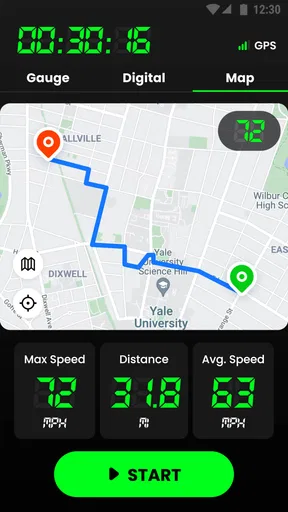
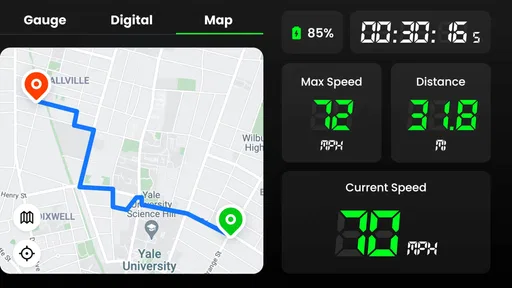
- Trip Recording: You can track your routes and save them. It’s perfect for reviewing your journey or showcasing your cycling routes to friends.
A small but worthwhile preparation step is matching the unit to the situation before travel. If I normally think in kilometers per hour but the car display uses miles per hour, a mismatch invites mental arithmetic at exactly the wrong time. I’d also decide whether I actually need trip recording before leaving: the value is in reviewing a route later, not in collecting a record I won’t use. If I’m only checking current speed, keeping the task simple is the safer choice.
Diving Deeper into the Experience
Now, let's talk about the user experience. The design is clean, and the app runs smoothly without any noticeable lags. I mean, who doesn’t love an app that doesn’t crash at the most inconvenient times?
The GPS connectivity is solid, which is crucial for an app like this. It picks up signals quickly, and I haven’t experienced any drop-offs, even in areas where my phone struggles with reception. That’s a huge plus in my book.
GPS reliability is not just about the app; it also depends on the phone and the environment. A tunnel, covered parking, or tall buildings can interfere with location reception, and battery-saving settings may affect how a phone handles location in the background. If a reading seems stuck or unexpectedly jumpy, I’d first check that location services are available, move to a more open area, and allow a little time for the signal to settle before deciding the app has failed.
There is a practical trade-off in how I’d use it during heavier sessions. Keeping a GPS app open for a long drive or ride can use more battery than a quick check, particularly if the screen stays on. I’d start with a charged phone, lower screen brightness to a comfortable level, and secure the device where it is visible without blocking the road or handlebars. Those habits help manage ordinary phone constraints; they don’t guarantee a particular battery life.
Another useful distinction is between losing a reading briefly and losing confidence in a whole trip record. If the signal is interrupted, I wouldn’t assume every point on a saved route is equally precise. For a casual ride recap, an imperfect trace may still be interesting. For work, training analysis, or evidence that needs to be exact, I’d choose equipment designed for that purpose and treat the phone’s GPS record as supplementary.
As a real-world example, imagine leaving home for a weekend cycle and wanting to know whether a long downhill section is faster than it feels. I’d check the app while stopped, confirm the units, mount the phone securely, and start the ride without touching the screen. Afterward, a recorded trip can help put distance and pace in context. That workflow makes the app useful without turning it into a reason to handle a phone while moving.
It is also worth deciding who should skip this kind of tool. If I needed spoken navigation, live traffic decisions, detailed training metrics, or a display built specifically for a vehicle, I’d choose a map service, cycling computer, or the vehicle’s own instrumentation instead. Someone who rarely travels and has no interest in checking speed or distance may not gain much from installing a dedicated speedometer. Its strength is narrowness, and that is only an advantage when the narrow task is one you actually have.
The app is free to install, with in-app purchases ranging from $4.49 to $49.99 per item. I’d begin with the basic experience and decide whether any paid option is relevant only after using it for the specific task I have in mind. It is rated for Everyone, runs on Android 6.0 or later, and version 1.2.5 is the current version. With a 4.5 average from around 152,000 ratings and more than 10 million installs, it has clearly reached a broad audience, though popularity alone doesn’t tell me whether its focused approach suits my routine.
For recovery after a hiccup, I’d keep the fix simple: stop somewhere safe, check that location services are on, and reopen the app if its display no longer seems to respond. I would not troubleshoot while driving or cycling. If a phone repeatedly struggles to get a stable GPS signal in places where I need accurate readings, switching to a dedicated device is more sensible than relying on an app to overcome the handset’s limits.
Another thing I appreciate is the battery consumption. We all know GPS can be a battery drainer, but the app seems optimized to minimize the impact. Of course, like any GPS-heavy app, it’s a good idea to have a charger handy for longer trips.
My Final Thoughts
So, what’s the verdict? If you’re looking for a reliable and easy-to-use speedometer app, Speedometer: GPS Speedometer is a fantastic choice. It’s not overloaded with unnecessary features, which I find refreshing. Sometimes, less is more, right?
It’s ideal for drivers and cyclists, but honestly, anyone curious about their speed will find it handy. Plus, the ability to track trips and get alerts for speed limits adds a layer of safety and convenience that’s hard to beat.
My recommendation comes with a clear boundary: I see it as a handy extra, not a driving authority. A GPS display can support awareness, but it should never replace attention to the road, posted limits, or the vehicle’s own instruments. If I wanted a quick personal check, a simple trip reference, or a way to satisfy curiosity on a walk, I’d consider it. If accuracy under difficult conditions or specialist analysis were essential, I’d use a more purpose-built option.
So, next time you hit the road or the trails, give this app a spin. You might find it becomes one of those apps you didn’t realize you needed, but now can’t live without. Happy travels, and keep it under the speed limit!
Pros
- Accurate real-time speed tracking.
- User-friendly interface and easy navigation.
- Customizable display options.
- Works offline with GPS support.
- Battery-efficient compared to similar apps.
Cons
- Ads can be intrusive at times.
- Requires location access at all times.
- Limited features in the free version.
- May drain battery on older devices.
- Occasional GPS signal loss in remote areas.
FAQs for Speedometer: GPS Speedometer
How accurate is Speedometer: GPS Speedometer in measuring speed?
Speedometer: GPS Speedometer uses your device’s GPS to provide real-time speed measurements. The accuracy largely depends on the GPS signal strength and quality. In open areas with clear skies, the app can be very precise. However, in urban areas or places with obstructions, the accuracy might slightly decrease.
Does the app work offline or without an internet connection?
Yes, Speedometer: GPS Speedometer can function offline since it relies on GPS signals rather than an internet connection. However, some features, like map integration or real-time traffic updates, may require internet access. Ensure your device’s GPS is enabled for optimal performance in offline mode.
Is it possible to switch between different units of measurement in the app?
Absolutely. Speedometer: GPS Speedometer allows users to switch between different units of measurement, such as miles per hour (mph), kilometers per hour (km/h), and knots. This feature is easily accessible in the settings menu, making it convenient for users in various regions.
Can I use the app while driving without it distracting me?
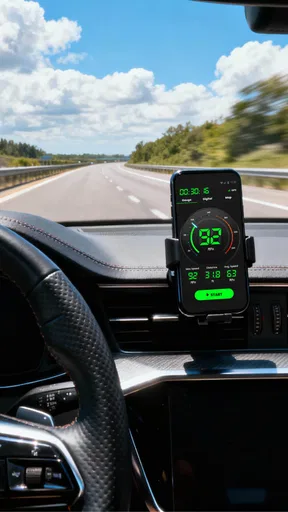
The app is designed with user safety in mind. It features a simple, clear interface with large numbers that are easy to read at a glance. It’s recommended to set up the app before driving and use a phone mount to minimize distraction while on the road.
Does Speedometer: GPS Speedometer have any additional features beyond speed measurement?
Yes, the app offers several additional features including trip tracking, distance measurement, and a heads-up display (HUD) mode. Some versions may include features like altitude measurement and a compass. These features enhance the app’s functionality beyond basic speed tracking.


